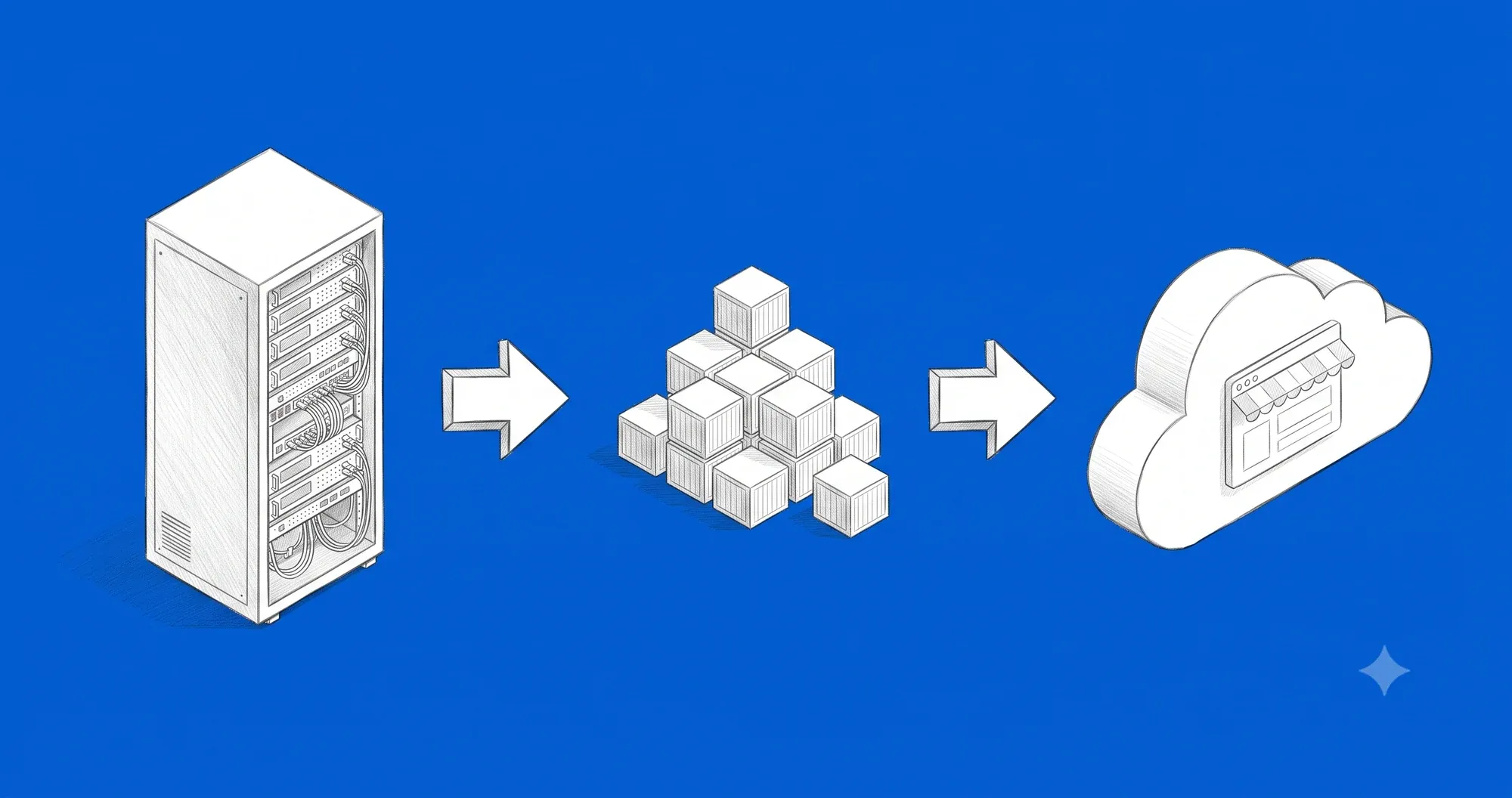
Containers, Kubernetes, cloud, serverless, SaaS — five buzzwords everyone uses, but few can fit into one picture. Yet it is one story: each stage appeared to fix the previous one’s problem and left a new one behind. No definitions, no code — you click, you experiment, and you see for yourself why each layer appeared, and what all those “as a service” models really are. To keep it concrete, we follow an entrepreneur who opens example.com, a small online shop that sells fireworks: across thirty years of infrastructure, a developer will see where their daily work sits in this stack, and a person who runs a team or company will finally understand what their technical people are actually talking about. And by the end you will have a simple way to judge any of them: how much responsibility you hand to a provider, and how much control you give up for it.
Physical servers
A physical server is simply a computer — but one built to stand in a server room and run for years without being turned off. See what it really looks like.
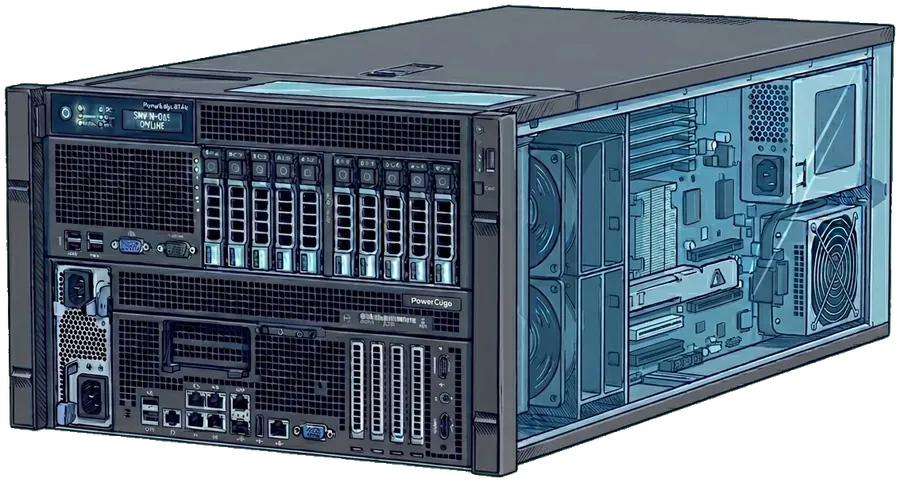
This is what a real server looks like — an ordinary computer with no monitor, but with disks, network ports and its own power supply. We won't need it in this much detail from here on.
This setup — your own hardware in your own server room — is called on-premises (on-prem for short). The rest of this story is just more layers built on top of such a machine.
The year is 2003. Our entrepreneur launches the example.com shop and needs servers for it.
The server room in the office basement is empty — the shop has nothing to run on yet. Two servers are needed: the application and the database never share one machine — if the shop had a vulnerability, an attacker shouldn't reach the customer data in the database straight away. Time to order the hardware.
Some configuration, a bit of marketing — and the shop is live. First week: five orders; after a month, a hundred a day; after half a year, a steady base of customers. This is where the real test of the infrastructure begins: for most of the year the power is wasted, but in December, when everybody buys fireworks for New Year’s Eve, the servers cannot keep up — and the only fireworks that night go off in the server room.
The shop runs on two servers with fixed power — exactly what the owner bought. During the day the traffic is healthy. Watch what happens to that capacity as the traffic changes.
On the second of January the entrepreneur counts the losses: at the peak of the night, some customers saw an error instead of fireworks and will not come back — they will buy from a competitor whose shop did not go down. The conclusion “buy more power” sounds simple, but it is not a slider: you have to guess when (too early and you pay for the excess all year, too late and the hardware will not arrive in time — ordering takes weeks), and swapping in stronger machines is itself a multi-week project in which the shop has to stop and the data has to move without a single slip.
New Year's Eve again, and the servers are the same as last year — the wave of customers once more outgrows their power, and every unhandled order is a customer lost to the competition.
There is one more problem nobody wants to think about: no spare. A dead disk, a power cut, or spilled coffee is enough — and the whole shop goes dark together with the database, and a new server takes weeks to arrive. You can keep a second machine in reserve, but that is a double bill, a second setup, and constant data syncing — most small companies keep one and hope for the best.
The shop and the database run in one server room, with no spare machines. See what happens when one of them goes down.
Three problems, one common root: the application is glued tightly to its server — power is hard to guess, swapping takes weeks, and one failure kills the whole shop. What if we unglued the applications from the hardware and fit several separate ones on a single machine — so that the shop and the database still do not get in each other’s way?
Virtualization
A special program goes onto the physical server — a hypervisor, a piece of software that pretends to be hardware. Each application runs in a separate virtual machine (VM) and thinks it has a whole computer to itself: its own system, memory, disks. Underneath, all the VMs share one physical processor, memory, and disks through the hypervisor. There are several hypervisors (VMware, Hyper-V, KVM), but for this story they do the same thing: they let you place many VMs on one physical server.
An empty server room. Let us start by buying a server.
Nothing is free. The hypervisor itself eats some power, and every VM carries a full operating system inside — it takes memory and CPU before the application does anything. There was no such overhead on bare metal, so you cannot fill the host to the brim: some headroom has to stay for real traffic.
Even so, the jump is huge. The shop and the database, until now on two separate machines, now share one server — each in its own VM, almost as isolated as before, but in one box. The whole thing is easier to operate: you dump a VM to an image, and you keep a ready, fully configured server on standby — when the host goes down, you switch the whole stack onto it right away, without the hours of configuration that a bare-metal swap used to eat.
The shop and the database sit as two VMs on one server — one machine fewer in the server room, and customer traffic is flowing.
And yet one thing virtualization did not touch. The host is still one finite, physical server; we packed more onto it, but we did not add a single gram of power. A big enough wave is enough, the headroom runs out, and both VMs choke at once — because they share the same machine. And then the only way out is exactly like in 2003: buy another physical server and wait weeks for it.
The shop and the database sit as two VMs on one host and calmly handle the daily traffic.
But you still buy power in whole servers — sized for a normal day, standing half empty in July, pushed to the limit on New Year’s Eve, and every added bit of power is, again, weeks of waiting for hardware. Somewhere between 2003 and 2005, Amazon’s engineers asked: what if you did not touch the hardware at all? If one machine is split into dozens of VMs, you can also sell it by the hour.
IaaS — the cloud
In August 2006 Amazon launches EC2. In the browser you pick power and a region, click “launch” — a few minutes later the machine is running with its own IP address. You pay ten cents for every hour it runs; turn it off after two — you pay twenty.
Underneath it is exactly what the entrepreneur had at home: physical servers, a hypervisor, VMs. Except that the owner of the hardware, the power, and the night-time support is now Amazon — you buy just the VM, and only for the time you need it. This model is infrastructure as a service — IaaS for short. There are several providers (AWS, Google Cloud, Azure, and in Europe Hetzner or OVHcloud), but at the base layer they sell the same thing: VMs in a data center, paid by time.
This is Amazon's server room — physical machines with hypervisors, shared by many customers at once. A single machine fits far more virtual servers — how many depends on the power of the physical hardware. Exactly which technology providers use today isn't known for certain, but the idea is the same: virtualization.
Selling VMs by the minute changed everything — the era of the startup with a credit card began: you do not need a million dollars in servers to compete with a corporation. You pay five dollars with two customers, and with two million you pay as much as needed and only when needed. It is IaaS that became the foundation of everything that came later: platform as a service (PaaS — Heroku, Vercel), ready products (Shopify, Notion), serverless — more on each later.
The entrepreneur shuts down the server in the basement and moves everything to AWS — two VMs, one for the shop, one for the database. For the customer nothing changes; it is just that the whole dance now happens on hardware nobody will ever see.
The shop and the database run as two virtual machines in AWS — not a single cable left in the basement. Customers are buying, everything works.
It could have been done differently — several smaller machines behind a load balancer (horizontal scaling) instead of one bigger one. But a VM takes full minutes to start, so before the replicas are up, a sudden wave is already over — here it was simpler to add power vertically, and smooth horizontal scaling will wait for the next stage. Either way, the cloud changed the economics of the whole stack: instead of buying hardware up front, you pay for usage — scale on demand, a server in Singapore or Brazil in a few clicks, and backup, power, and physical security are the provider’s job.
But the cloud did not solve everything. Migrating a big, old application can be a months-long project. And, less obvious: you get a VM with a system, but you still push the application, libraries, and configuration in by hand — and a developer’s environment almost never matches the production one.
Two identical servers: DEV for trials and PROD for customers. For now both are clean — no software at all.
“Works on my machine” became every developer’s joke — a joke with a real cost: evenings lost on version differences, regressions on production on a Friday, debugging “why is it like this for me and different for you”. The next stage solves exactly this problem.
Docker and containers
Two problems were left in the cloud: migration is expensive, and “works on my machine” still poisons developers’ lives. The solution was not new — Linux had been isolating processes for a decade — but only Docker, in 2013, turned it into something for ordinary people.
You pack the application with its whole environment — libraries, runtime, system tools (but without the kernel — that stays on the host side) — into one package called an image. The image runs everywhere (laptop, CI, production) the same way, because it has everything it needs inside. A running image is a container — Docker starts it in a second, because there is no system to boot. Docker itself is just a normal application on a VM; it gives a new run layer — like a hypervisor, but at the level of processes, not hardware.
On the left the developer’s machine, on the right production — two worlds where the shop could behave differently.
The concepts are universal. In modern systems (Kubernetes, AWS Fargate, Cloud Run) Docker itself is sometimes replaced by alternatives, but the image and the container stay — most serious deployments in 2025 go through these two things.
The first thing to disappear is “works on my machine”: since the image contains the system, the libraries, and the code, the same image on DEV and PROD gives exactly the same result.
On the left a single ready image. On the right two environments — Dev and production — with the same Docker engine.
The “works on my machine” war is over, and the DevOps culture — born a few years earlier — gets its defining tool. A deploy is “swap the image for a newer one”, a rollback is “swap it back” — seconds instead of hours. Part of the migration problem from the previous stage also disappears: an image is a packed bundle, so you can move the same shop from AWS to GCP, or from the cloud to your own server, without matching the environment by hand. This does not solve a full migration (data, integrations, network remain), but matching library versions between providers — which used to take weeks — is gone.
Second, containers are surprisingly light. With no kernel in the image (they use the host’s kernel) the package weighs megabytes, not gigabytes, and the boot is a fraction of a second. Where five VMs used to fit, a hundred containers will now run.
One replica of the shop on each side — on the left as separate virtual machines, on the right as containers on a single host.
But the fast start of containers makes easy what used to take a lot of work in the cloud. Horizontal scaling, until now slow and labor-intensive — because a VM starts in minutes — now happens on the fly: a container comes up in a second, so you add shop replicas as you go, each from the same image, freely spread across different machines.
Clients send traffic, and the load balancer spreads it across the running replicas of the shop. For now just one is running.
A load balancer splits the traffic between the replicas. For now we simplify its role, but it is a key piece — in this model you have to configure and maintain it yourself (later we will show how to take it off your hands). What matters is the dynamics of containers: you add and remove replicas on the fly, and power grows with them — horizontal scaling at the pace of the wave, not of a hardware purchase. Hence reliability too: a machine can go down and the shop keeps running, because the replicas sit on more than one — at the cost of another light container, not a second full machine. But some of these moves do not happen on their own: a new machine has to come up, Docker has to be installed on it, and after a failure someone has to reconfigure the load balancer. How to automate this — we will see next.
Time to see all of this put together on our shop. The example.com team packed the shop engine into a Docker image and deployed it as a container on the existing VM in AWS. December, the same traffic as before, the same New Year’s Eve. The fourth time in the company’s history — the first one won.
The shop and the database run as containers, and the load balancer routes traffic to them. Drag the slider to set the traffic level.
But look how many hands it cost: someone watched the wave, added replicas, set up and turned on a second machine, installed Docker, reconfigured the load balancer, and after the peak rolled it all back. Every reaction to the traffic was clicked by a human — this is still manual orchestration. And there is more and more of it: since containers are so light, there are suddenly hundreds of them. The shop is no longer one application, but a dozen or so containers — frontend, backend, cart, payments, search, cache, sessions, database. Who watches this herd? What happens when a container, or a whole machine, goes down? What about New Year’s Eve, when the traffic jumps?
Kubernetes
The year is 2018. You take your machines in the cloud and install Kubernetes on each one — they stop being separate servers and become one cluster. Instead of reacting by hand over and over, you declare what the state should be — “there must always be three running copies of the shop” — and the cluster constantly catches reality up to that declaration and decides for itself where to put what. A copy dies, a new one appears. A machine dies, the copies move to another. Traffic grows — more copies join; it drops — they disappear. No manual scripts and no night shift by the phone. From this one idea comes everything else: self-healing, automatic scaling, and updates with no downtime.
Two machines in the cloud, separate for now — each would have to be configured and watched over on its own.
The strongest consequence of this declarativeness has a name — self-healing. You declare “there must be N replicas”, and the cluster makes sure that many stay alive — whether a single pod or a whole machine dies. Imagine a text at three in the morning: “our AWS server is down”. Without Kubernetes that is an outage until someone manually moves the traffic — see what the cluster does with it.
The cluster keeps the declared number of shop replicas alive, spread across the machines. Kill any pod or a whole machine and watch what Kubernetes does.
What if the remaining nodes have no room left? Kubernetes will not do magic — the pods stay as pending, the declaration is not satisfied. That is when the Cluster Autoscaler steps in and adds new VMs to the cluster under the pressure of the declaration. Paired with the Horizontal Pod Autoscaler (which watches how many pod replicas to run), this gives an infrastructure that breathes with the traffic: pods and machines arrive under load and disappear when the wave drops.
The cluster starts with one machine and one pod. Move the traffic slider and watch it adjust on its own.
This is the moment when operational work stops being installing and becomes watching. You declare the state, and the cluster tunes itself — it survives hardware failures and scales with traffic — so you get high availability without a 24/7 shift, and the team works on the product.
A few years later, when good managed clusters appeared, the example.com team takes a step it cannot undo: it rolls up the last manual pipelines and moves the shop and the database onto a cluster. The entrepreneur once called at night for a new server; today he looks at a dashboard with a coffee, and the cluster adds power under traffic by itself.
New Year's Eve at example.com — at midnight a wave of customers hits the shop and orders pour in. Click „New Year's Eve” and watch the cluster catch the peak on its own. Without a midnight phone call to anyone.
One thing still nags, though: Kubernetes itself is complex. Maintaining it — updates, security, network, storage — is work for a separate team or a topic for separate training. So the next step of the evolution is different from before: instead of building the next layer yourself, you hand specific building blocks of the system to someone who does it better — starting with Kubernetes itself.
The “as a Service” era
Since the whole stack is already standing, the question from the start comes back: how much of this do you really have to do yourself? Less and less. Over the years a new wave arrives — services ending in -aaS, something as a Service: each layer of the stack can be rented and its maintenance handed to a provider who sells the result as a ready block. There are far more models than we show here — serverless/FaaS, managed queues, caches, and many others — they differ only in how high the line goes above which someone else is responsible. And these lines blur more and more often, so a clear answer to “what is what” is rarely simple. We show four to catch the principle — the same story with a rising level of ambition: hand over the management of containers, hand over the database, hand over the whole platform, hand over the application itself.
KaaS — managed Kubernetes
After a year with its own cluster, the example.com team discovers a truth. Kubernetes on its own needs a lot of care — updates, security patches, network settings, health monitoring. That is a full-time job for two people who, instead of growing the shop, look after the cluster engine itself.
Managed Kubernetes — Kubernetes as a Service, KaaS — takes this weight off. You pick a cloud provider and say: “I want a Kubernetes cluster, but you keep its heart yourselves”. The provider updates it at night, patches it, monitors it. You still see your pods and your database, but you do not have to touch all the machinery below.
A cluster you keep yourself: the Kubernetes engine runs on rented machines, and your shop pods run on top of it. Updates, patches and watching that engine are your job. Pick a managed-cluster provider.
This is how the example.com team switches the shop from its own cluster to a managed one. The same shop pods, the same database, the same traffic. The difference: when something breaks deep in the cluster on a Sunday at three in the morning — nobody calls them with an alarm. It fixes itself.
The price is real. You pay the provider more than for the hardware alone, because besides compute power you are buying peace of mind. And it is easier to get into this deal than out of it — the infrastructure naturally fits a specific provider, and moving to another is real work.
One clarification on the name. What we just described — a managed cluster you still see and operate — is managed Kubernetes (KaaS). The term CaaS — Container as a Service is usually kept for a step further: services like AWS Fargate, Google Cloud Run or Azure Container Instances, where there is no cluster to see at all. You hand over a single container, the provider decides where it runs, and even the machines underneath disappear from view.
DBaaS — database as a service
An application pod can be copied, killed, or restarted freely — no data is lost because of it. With a database it is completely different. The database is a sacred place: customer orders, their contacts, stock levels. One incident where the backups turn out to be a week old, and you lose trust you will not rebuild in a year. But caring for a database — backups at night, health monitoring — is a discipline of its own, which a team usually does not have.
DBaaS — Database as a Service — hands this to a provider who has had it solved for a decade. You say: “I want a database for production”. You get an address, a password, and a promise: the provider makes backups, patches it itself, and keeps it from going down. The database no longer sits in your cluster, but at the provider, and the application connects to it over the network.
The shop and its database run in one cluster — you look after the database yourself: backups, patches, watching over it so it never goes down. Pick a managed database service.
Now, when the provider updates the database engine on a Sunday night, the example.com team will not even notice. The price of this peace is real: the provider charges noticeably more for the database than for the same thing on your own machine. But the first failure without a good database administrator can cost ten times more than a year of the difference. And, just like with managed Kubernetes — getting in is easy, getting out means real work moving gigabytes of data to another provider.
PaaS — platform as a service
Managed Kubernetes took away the night calls, but the cluster is still yours — and it is a powerful, complex application that you have to know and operate. Scaling, high availability, networking, storage — you configure all of it first, before it starts working on its own. In practice this means a person (or a team) who knows Kubernetes and keeps it running.
The next step removes this weight too. PaaS — Platform as a Service — is a ready platform for your code: you create an account at a provider (Heroku, Vercel, Render, and others), and servers, scaling, and availability become their job. The cluster disappears from view — what stays is the one thing you really want to work on: the application code.
The example.com shop and its database run in their own Kubernetes cluster — powerful but complex machinery that has to be known and maintained: scaling and high availability need configuring and looking after. Pick a platform provider (PaaS) and create an account.
This is how example.com hands over the last piece of managed infrastructure — the cluster is gone, only the shop’s code remains. The price is familiar: you pay the provider more than for bare hardware and tie yourself more tightly to its platform, but you no longer maintain anything below your own code.
SaaS — software as a service
With managed Kubernetes the pods run themselves, with DBaaS the database never goes down, and with PaaS the whole cluster is gone. One question remains: why maintain the whole application at all? All the shop’s code, updates, integrations with payments and couriers, the admin panel. A whole team that, instead of building the shop’s unique value, patches the foundation.
SaaS — Software as a Service — goes one step further and takes the whole thing. You do not get infrastructure or a framework, just a ready product. There are many providers of ready shops — Shopify, BigCommerce, Wix, and others — but they work the same way: you create an account, click through the configuration, upload products, and the shop works. Underneath, the same provider runs thousands of other shops; you share the same infrastructure with them, but you do not even know it.
Instead of building and maintaining your own store, you buy a finished product from a provider. Pick a provider and create an account.
This is how, in 2024, the example.com team ends the era of its own shop engine: export the products and customers, switch the domain — a week of work. The shop still runs, but it is no longer their application — it became a configuration at the provider. The stack of abstractions closed with its last layer. The balance is clear: you no longer maintain anything (servers, database, updates, security are the provider’s job), and you start the shop almost instantly and cheaply. You pay for it with control — the provider decides what is possible at checkout, which integrations, and how the mobile version looks — and with dependency, because leaving means rewriting the shop from scratch somewhere else. For 95% of shops it is a great deal; for those with truly unique needs — the road back to your own stack.
The problem that vanished
You walked the whole stack with example.com — from a physical server in the basement, through virtualization, the cloud, containers, and Kubernetes, all the way to the era in which the shop became a configuration at a provider.
The whole stack, layer by layer — from the physical machine up to your application. Move the slider to highlight and get to know each layer on its own.
This same stack is the foundation of the whole wave of “as a service” offerings: each next model hands the provider a bigger piece of responsibility for the infrastructure, and SaaS goes the furthest — it turns software into a ready product to rent. There are also partial delegations, cutting a single layer out of the stack: KaaS takes over the cluster orchestration, and DBaaS the database alone. Where exactly does the line run between what you do yourself and what the provider takes care of? Move it and see.
On-prem: from power and networking up to the application code, the team runs the whole stack itself.
Seen from above, the whole road comes down to one thing: the problem we started with — how to keep the shop running when traffic jumps and hardware fails — simply disappeared from sight. The wave comes and goes, capacity is added by itself, and nobody jumps up at night for a failure. Thirty years of evolution is one problem that, along the way, dissolved into the next layers.
Because each of these layers did not so much add new options as take away hassle — every time in exchange for a piece of control. And this is the whole art of choosing: not to reach for what is currently on top, but to know how much hassle you want to give away and what price in control you are ready to pay for it. The words that at the start sounded like jargon — containers, cluster, “as a Service” — are today simply the names of the next burdens taken off your back.
Was this explainer helpful?
Glad it helped — what worked?
Thanks — what was missing?
Thanks for the feedback! 🙏